User Time Log System using VB.NET and MS Access Database with Source Code
A system that acts as biometrics does. With real-time logging, this system makes it possible to record the time-in and time-out of a user's attendance with ease. It provides a user-friendly UI and sho...
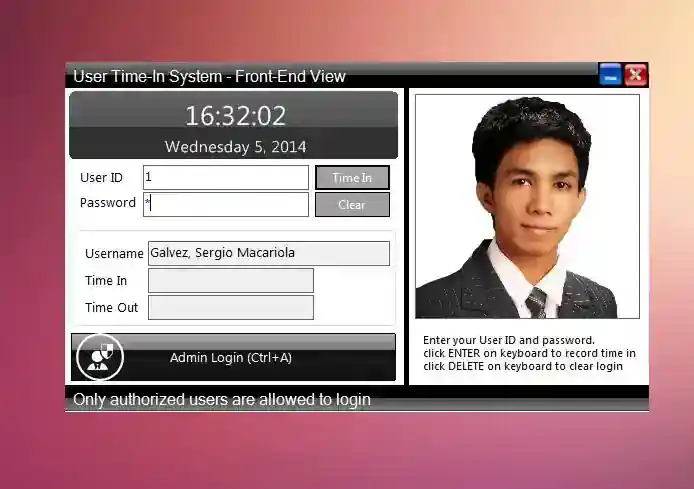
User Time Log System using VB.NET and MS Access Database with Source Code
A system that acts as biometrics does. With real-time logging, this system makes it possible to record the time-in and time-out of a user's attendance with ease. It provides a user-friendly UI and shortcut keys and for fast processing of records and logging. It also has a picture for each user to ensure the user's identity when being logged. This app is good for school and office wherein they maintain a huge record for attendance. Hope you all like this system :)
Features
Admin
User List
User Form (Add/Edit)
Log History
Public
Time In/Out Log
How to Use
First, the system admin must populate the user list along with some necessary information. When creating a new user, the password will be "password" by default and this can be updated afterward. In order for the user to log their time record, they just have to enter their user ID and password and the system itself will detect if the user has already a "time-in " record for the day, the system will show the "time out button" otherwise the "time in button" will be shown.
How to Run
Requirements
Download and Install Microsft Visual Studio 2010 or higher version.
Download and Install Microsft Access Database Engine 2010 / ADO.Net.
Setup
Download and Extract the source code zip file.
Open the extracted file and locate the solution file known as "My Application.sln".
Open the solution file with your Microsoft Visual Studio Software.
Press the "F5" key on your keyboard
System Default Accesses:
Sample User Login Account:
Account Number: 11-0127
Password: 1
ADMIN ACCESS:
Username: admin
Password: admin
Note: Some issues were not yet fixed thus I will be updating this in several upcoming weeks/months. And I hope that this project will be used for educational purposes and that the system itself maintains its copyrights as proposed.
Enjoy :)
For the system installer, click the link below
http://galvezsergio.url.ph/portfolio_page/user-time-in-system/
Sergio Galvez's Website:
Screenshots

Download Project
