Modern Hospital Management System Using Bunifu Framework with Full Source Code
Modern Hospital Management System Using Bunifu Framework with Full Source Code The Modern Hospital Management System is an automated system that is developed using VB.Net, Bunifu Frameworks and MySQL ...
Modern Hospital Management System Using Bunifu Framework with Full Source Code
Modern Hospital Management System Using Bunifu Framework with Full Source Code
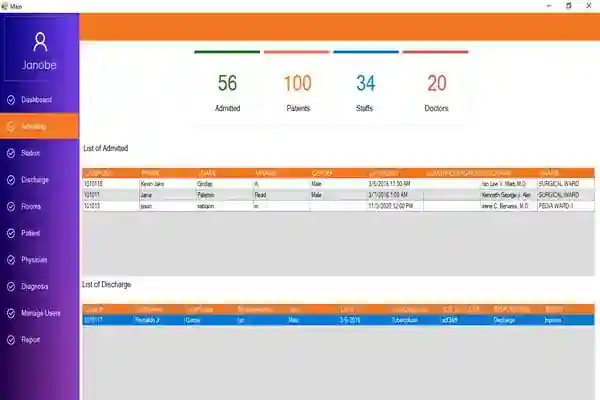
The Modern Hospital Management System is an automated system that is developed using VB.Net, Bunifu Frameworks and MySQL for the database. The main purpose of the Modern Hospital Management System is to simplify the distribution of records of the patients from the admission, Discharge, Diagnostic test result and many more.
The controls used of Modern Hospital Management System are:
Bunifu.UI.WinForms.BunifuPanel,
Bunifu.UI.WinForms.BunifuButton.BunifuButton,
Bunifu.UI.WinForms.BunifuDatePicker,
Bunifu.UI.WinForms.BunifuDataGridView
About the Modern Hospital Management System
This Modern Hospital Management System is a big help in the proper filing of patient’s medical records. Compared to manual management that takes a lot of time and sometimes records are misplaced if not handled properly. There are lots of benefits of Modern Hospital Management System just like, minimizing the waiting hours of patients, easy retrieval of records and ensures that the medical records are accurate. It is very important to keep medical records properly because it will help the doctors on the correct treatment of patient under his care. The Admin plays an important role in the Modern Hospital Management System and it has a modern design with the use of Bunifu Frameworks.
These are the following features of Modern Hospital Management System
Rooms
adding
updating
Listing
Physician
adding
updating
Listing
Diagnosis
adding
updating
Listing
Patient
adding
updating
Listing
Admit Patient
Discharge
Patient Reports
Manage User
Login and Logout
Download and install the following system requirements:
Bunifu Frameworks
xampp latest version
mysql-connector
mysql-connector-odbc
Microsoft Visual Studio 2015
How to setup the Modern Hospital Management System
Download the zip file.
Download and install XAMPP
Run the XAMPP control panel and start MySQL and Apache
Go to C:\xampp\htdocs and extract the downloaded zip file (hospitalrecords) inside the folder
Open the browser and go to http://localhost/phpmyadmin/ to create the database
Click the new to create a database.
Name the database hospitaldb.
Click import to import the sql file.
Click choose file and select the file that can be found inside the hospitalrecords folder
Click go.
How to run the Modern Hospital Management System
Open the folder hospitalrecords and click HospitalRecords.sln to open the system. After that, press F5 to run the system
Accessing admin accounts
Username: admin
Password: admin
This Modern Hospital Management System Using Bunifu Framework with Full Source Code is for educational purposes only. You can download it as a reference and expand your knowledge in making a system. You can freely modify it, according to your desire.
Screenshots

Download Project
