Student Voting System Using SQLite and Tkinter in Python with Source Code
The Student Voting System is an interactive desktop application built entirely with Python using the Tkinter library. The application allows users to ...
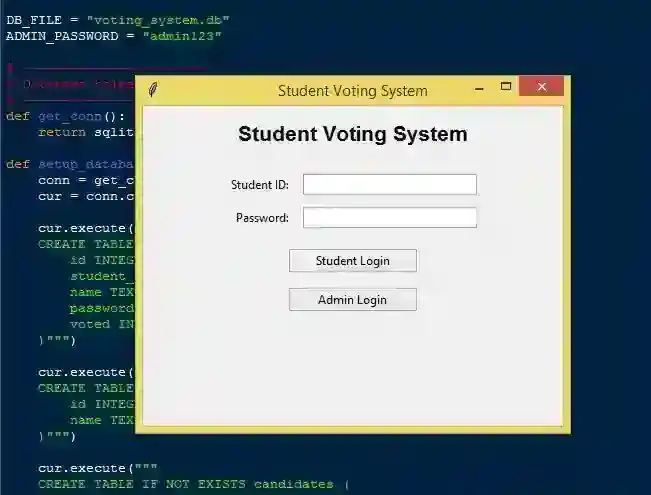
Student Voting System Using SQLite and Tkinter in Python with Source Code
The Student Voting System is an interactive desktop application built entirely with Python using the Tkinter library. The application allows users to manage voting records through a graphical user interface (GUI) with full CRUD (Create, Read, Update, Delete) functionality. It is divided into two sections — one for students and one for the admin. The Student Voting System Using SQLite and Tkinter also provides accurate vote counting, which can be viewed on the admin side. The admin can add candidates along with their respective positions and also manage student accounts. This project is an excellent way to practice and reinforce essential programming concepts, making it a valuable exercise for enhancing your Python skills in application development. The Student Voting System Using SQLite and Tkinter in Python with Source Code is free to be downloaded just read the content below for more info. This application is for educational purpose only. Student Voting System Using SQLite and Tkinter in Python with Source Code Basic Information
Language used: Python Coding Tool used: Built-in Python IDLE Type: Desktop Application Database used: SQLite
About Student Voting System The Student Voting System Using SQLite and Tkinter is a comprehensive desktop application developed in Python that streamlines the process of conducting student elections in schools or universities. Built with Tkinter for the graphical user interface, it offers an intuitive and interactive environment where both administrators and students can perform their respective tasks efficiently. The system uses SQLite as its database to securely store and manage all essential data, including student accounts, candidate information, voting categories, and election results. Administrators have full control over the system — they can add new student accounts with randomly generated passwords, create and manage different candidate categories such as president, vice president, and secretary, and view or monitor the voting outcomes in real time. Students can log in using their assigned credentials to cast their votes in a secure and transparent manner, ensuring the integrity of the election process. This project is an excellent example of combining GUI programming with database integration to develop a practical, secure, and easy-to-use voting management system for educational institutions. Student Voting System Using SQLite and Tkinter in Python with Source Code Features
Graphical User Interface (GUI)
Built using Tkinter for an easy-to-use and interactive interface. Provides separate windows for Admin and Student users. Clean layout with buttons, forms, and tables for data management.
SQLite Database Integration
Uses SQLite as the backend database for storing all data. Stores student accounts, candidates, and voting results securely. Automatically creates tables when the program runs for the first time.
Admin Login System
Admin access is protected by a password authentication. Prevents unauthorized users from modifying system data. Only admins can manage students, candidates, and categories.
Student Account Management
Admin can add, view, and delete student accounts. Student passwords are randomly generated for security. Displays a list of registered students with their login credentials.
Candidate Management
Admin can add candidates under specific categories Allows adding new categories dynamically. Candidate details are stored in the database for reference.
Voting Process
Students can log in using their credentials to vote. Each student can cast only one vote per category. Prevents duplicate voting using a validation system.
Sample Application Screenshot:
Student Voting System Using SQLite and Tkinter in Python with Source Code Installation Guide
First you need to download & install the Python IDLE's, here's the link "https://www.python.org/downloads/". Download the source code in this site. Locate and Extract the zip file. Open the extracted folder Locate the py file. Then open the file via python IDLE or any IDE that supports python language. Run the py file to launch the program.
That's all, The Student Voting System was created fully functional using Python language. I hope that this project can help you to what you are looking for. For more projects and tutorials please kindly visit this site. Enjoy Coding! The Student Voting System Using SQLite and Tkinter in Python with Source Code is ready to be downloaded just kindly click the download button below. Related Projects & Tutorials Student Voting System
Screenshots


Download Project
