Guess the Number Game Using Tkinter in Python with Source Code
The Guess the Number Game is an interactive desktop application built entirely with Python using the Tkinter library. The gameplay is simple: your goa...
Guess the Number Game Using Tkinter in Python with Source Code
The Guess the Number Game is an interactive desktop application built entirely with Python using the Tkinter library. The gameplay is simple: your goal is to guess the number between 1 and 100, with only 10 attempts. The Guess the Number Game Using Tkinter features straightforward mechanics—each wrong guess provides a hint, indicating whether the number is higher or lower. This project is an excellent opportunity to reinforce essential programming concepts, making it a valuable exercise for improving your Python skills in game development. The Guess the Number Game Using Tkinter in Python with Source Code is free to be downloaded just read the content below for more info. This application is for educational purpose only. Guess the Number Game Using Tkinter in Python with Source Code Basic Information
Language used: Python Coding Tool used: Built-in Python IDLE Type: Desktop Application Database used: None
About Guess the Number Game The Guess the Number Game using Tkinter is an engaging Python project that combines logic and interactivity through a graphical user interface. In this game, the computer randomly selects a number within a predefined range, and the player’s goal is to guess it correctly. Using Tkinter, Python’s standard GUI library, the game provides an intuitive interface where players can enter their guesses, receive immediate feedback, and see hints such as “too high” or “too low” to guide them toward the correct answer. The game also keeps track of the number of attempts, adding a fun challenge for players to improve their performance. This project is not only entertaining but also educational, offering a hands-on way to practice programming concepts like loops, conditional statements, functions, and event-driven programming in Python, making it perfect for beginners and those looking to strengthen their coding skills. Guess the Number Game Using Tkinter in Python with Source Code Features
User-Friendly Graphical Interface
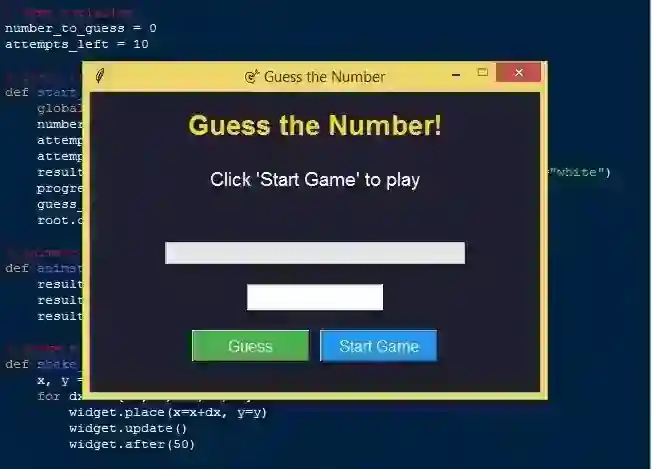
Interactive GUI built with Tkinter. Input field for users to enter guesses. Buttons for submitting guesses and restarting the game. Labels to display messages, hints, and game status.
Random Number Generation
Generates a random number within a specified range (e.g., 1–100). Ensures unpredictability for each new game session.
Gameplay Mechanics
Users input their guesses and receive immediate feedback. Tracks the number of attempts made by the player. Optional attempt limit to increase difficulty.
Sample Application Screenshot:
Guess the Number Game Using Tkinter in Python with Source Code Installation Guide
First you need to download & install the Python IDLE's, here's the link "https://www.python.org/downloads/". Download the source code in this site. Locate and Extract the zip file. Open the extracted folder Locate the py file. Then open the file via python IDLE or any IDE that supports python language. Run the py file to launch the program.
That's all, The Guess the Number Game was created fully functional using JavaScript language. I hope that this project can help you to what you are looking for. For more projects and tutorials please kindly visit this site. Enjoy Coding! The Guess the Number Game Using Tkinter in Python with Source Code is ready to be downloaded just kindly click the download button below. Related Projects & Tutorials Guess the Number Game
Screenshots


Download Project
