Dots & Boxes Game Using Pygame in Python with Source Code
The Dots & Boxes Game is an interactive desktop application built entirely with Python using the Tkinter library. The gameplay is simple yet engaging—...
Dots & Boxes Game Using Pygame in Python with Source Code
The Dots & Boxes Game is an interactive desktop application built entirely with Python using the Tkinter library. The gameplay is simple yet engaging—a two-player game where both players compete to form boxes and score points. The Dots & Boxes Game Using Pygame features straightforward mechanics in which players take turns drawing lines to complete boxes. This project offers an excellent opportunity to reinforce essential programming concepts, making it a valuable exercise for improving your Python skills in game development. The Dots & Boxes Game Using Pygame in Python with Source Code is free to be downloaded just read the content below for more info. This application is for educational purpose only. Dots & Boxes Game Using Pygame in Python with Source Code Basic Information
Language used: Python Coding Tool used: Built-in Python IDLE Type: Desktop Application Database used: None
About Dots & Boxes Game The Dots & Boxes Game Using Pygame is a digital adaptation of the well-loved pencil-and-paper strategy game, designed to deliver an engaging and interactive experience on screen. In this game, players take turns drawing lines between two adjacent dots, aiming to complete the fourth side of a box. Whenever a player successfully closes a box, it is marked with their color or initial, they earn a point, and they get another turn. The game continues until all boxes are filled, and the player with the highest score wins. Developed using Python’s Pygame library, this version features a clean and responsive grid interface, smooth animations for line placement, real-time score tracking, and turn indicators to keep gameplay flowing. It not only recreates the nostalgic fun of the classic game but also demonstrates practical applications of event handling, rendering, and game loop logic, making it an enjoyable project for both players and aspiring game developers. Dots & Boxes Game Using Pygame in Python with Source Code Features
Classic Gameplay Mechanics
Implements the traditional Dots & Boxes rules. Players take turns connecting dots with horizontal or vertical lines. A box is claimed when a player completes its fourth side.
Player Modes
Supports two-player local mode for competitive play.
Interactive Graphics
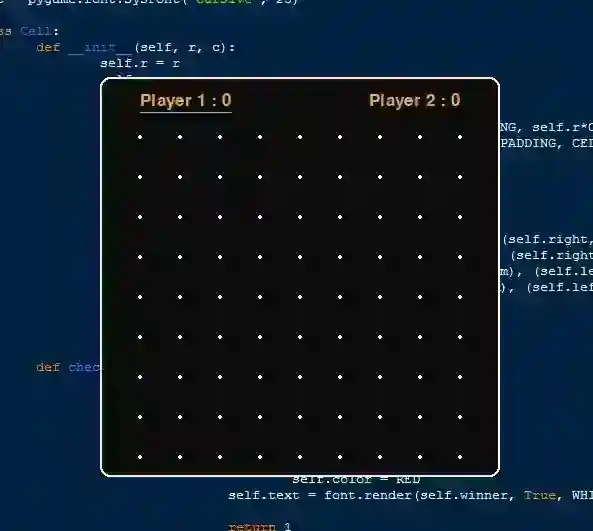
Grid of dots rendered using Pygame. Highlighted lines when hovering over possible moves. Player-specific colors for claimed boxes.
Real-Time Score Tracking
Live scoreboard displaying each player’s points. Updates instantly when a box is claimed.
Sample Application Screenshot:
Dots & Boxes Game Using Pygame in Python with Source Code Installation Guide
First you need to download & install the Python IDLE's, here's the link "https://www.python.org/downloads/". Download the source code in this site. Locate and Extract the zip file. Open the extracted folder Locate the py file. Then open the file via python IDLE or any IDE that supports python language. Run the py file to launch the program.
That's all, The Dots & Boxes Game was created fully functional using JavaScript language. I hope that this project can help you to what you are looking for. For more projects and tutorials please kindly visit this site. Enjoy Coding! The Dots & Boxes Game Using Pygame in Python with Source Code is ready to be downloaded just kindly click the download button below. Related Projects & Tutorials Dots & Boxes Game
Screenshots


Download Project
