Library Management System in VB.Net, MySQL Database, and Bunifu Framework with Source Code
This Library Management System is a software-based system that is made of VB.Net, MySQL database, and Bunifu Framework that helps the design more elegant for the user-interface. The main goal of this ...
Library Management System in VB.Net, MySQL Database, and Bunifu Framework with Source Code
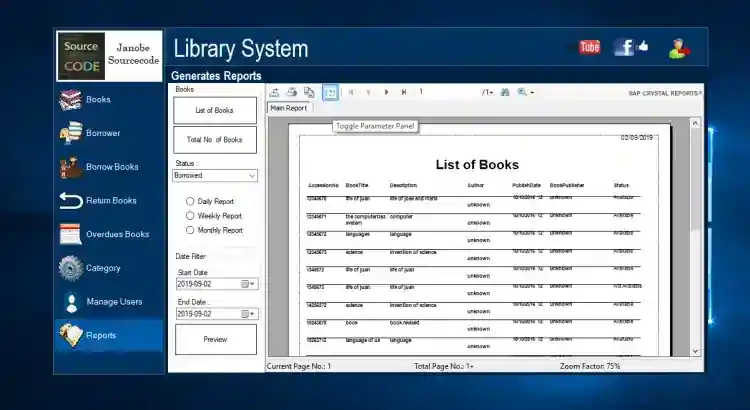
This Library Management System is a software-based system that is made of VB.Net, MySQL database, and Bunifu Framework that helps the design more elegant for the user-interface. The main goal of this system is to increase your library’s efficiency and save a lot of time for both librarians and users. The functions are very user-friendly that whenever the user uses this system, it helps the user find resources for reading, learning, and teaching with ease. This can be a big help for Librarians in keeping track of the books and their checkouts. Information is well kept in the database such as the Category of books and returning of books that have been borrowed with their due dates. This also provides Reports so you can view the List of Books, those who have borrowed the books, returned the books, and the List of Overdues depending on the transaction date.
Features
Manage Books
Manage Borrower
Manage Borrowing Books
Manage Returning Books
Manage Overdue Books
Manage Category of books
Manage Users
Generate Reports
List of Books
Inventory of Book
List of Borrowed
List of Returned
List of Overdue
Inclusive Dates
How to Run
Requirements: Download and install the following
xampp latest version
mysql-connector-net-6.4.4.msi
mysql-connector-odbc-5.1.9-win32.msi
Microsoft Visual Studio 2015 (recently tested using MS Visual Studio 2019 community)
Bunifu Framework
Setup
Download and Extract the provided source code zip file. (download button is located below)
Open your XAMPP's Control Panel and start the "MySQL" server for your database and "Apache" so you can use the PHPMyAdmin to manage the database of xampp.
Browse the PHPMyAdmin in a browser. http://localhost/phpmyadmin
Create a new database naming 'dblibrary'
Locate and Import the provided SQL file into your newly created database. The SQL file is known as "dblibrary.sql" included inside the extracted source code folder.
Locate the Solution File in the source code folder. The file is known as "LibraryManagementSystem.sln".
Open the solution file with your MS Visual Studio Software.
Press the "F5" key on your keyboard to run this Library Management System in VB.NET and Bunifu Frameworks Project.
Credentials:
Username: admin
Password: admin
DEMO
That's it! You can now explore the features and functionalities of this Library Management System Project using VB.NET. I hope this will help you and you will learn something useful with this project for your future VB.NET Projects.
For more information about the system. You can contact me @
Email – [email protected]
Mobile No. – 09305235027 – TNT
Youtube Channel - https://bit.ly/2LPn9Wu
FB Account – https://www.facebook.com/onnaj.soicalap
Or feel free to comment below.
Explore more on this website for more Tutorials and Free Source Codes.
Enjoy :)
Screenshots

Download Project
