Billing System Using SQLite and Tkinter in Python with Source Code
The Billing System is an interactive desktop application built entirely with Python using the Tkinter library. The application allows users to manage ...
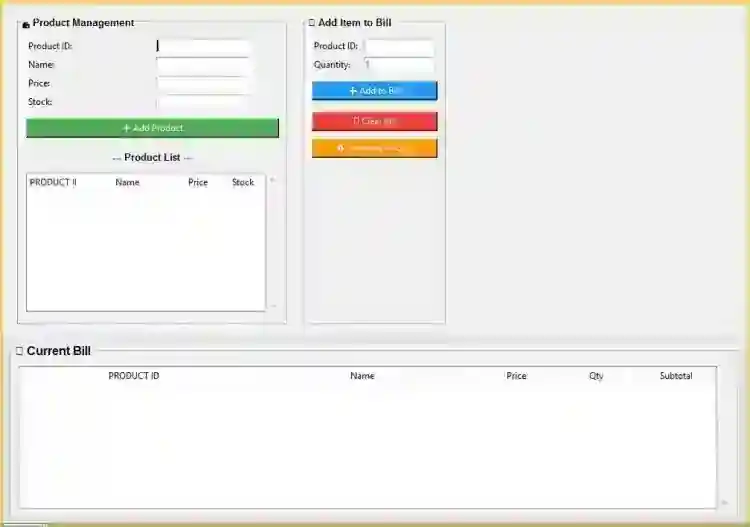
Billing System Using SQLite and Tkinter in Python with Source Code
The Billing System is an interactive desktop application built entirely with Python using the Tkinter library. The application allows users to manage the billing of products that have been purchased. The Billing System Using SQLite and Tkinter also features an inventory function that manages and handles the products. This project is an excellent way to practice and reinforce essential programming concepts, making it a valuable exercise for enhancing your Python skills in application development. The Billing System Using SQLite and Tkinter in Python with Source Code is free to be downloaded just read the content below for more info. This application is for educational purpose only. Billing System Using SQLite and Tkinter in Python with Source Code Basic Information
Language used: Python Coding Tool used: Built-in Python IDLE Type: Desktop Application Database used: SQLite
About Billing System Billing System Using SQLite and Tkinter is a desktop application designed to help users manage sales transactions efficiently. Built with Python’s Tkinter library for the graphical interface and SQLite for the database, this system allows you to record items, compute totals, store customer details, and generate receipts with ease. The program provides a simple and user-friendly layout where you can add products, update quantities, apply prices, and automatically calculate the overall bill. With integrated data storage through SQLite, all transaction records are saved securely for future reference. This project is ideal for small shops, school projects, and beginners learning how to combine GUI development with database management. Billing System Using SQLite and Tkinter in Python with Source Code Features
User-Friendly GUI Interface
Clean and intuitive Tkinter layout. Organized frames for products, customer info, and billing outputs. Easy-to-read buttons and labels for smooth navigation.
Product Entry System
Allows adding item name, quantity, and unit price. Listbox/table to display all added items. Automatic line-total calculation per item. Option to remove selected items from the list.
Automatic Total Calculation
Live subtotal update whenever items are added or removed. Tax/discount calculation options. Grand total computation with a single click.
SQLite Database Integration
Stores all bill records securely. Separate tables for customers, items, and billing transactions. CRUD operations (Create, Read, Update, Delete). Prevents data loss between sessions.
Bill Receipt Generation
Printable receipt displayed inside a text area. Includes date, bill number, customer info, and items. Auto-formatted alignment for better readability. Supports saving the receipt as a text file.
Secure Data Storage
Local SQLite file ensures safe and permanent storage. No external server required. Prevents accidental loss through structured table design.
Sample Application Screenshot:
Billing System Using SQLite and Tkinter in Python with Source Code Installation Guide
First you need to download & install the Python IDLE's, here's the link "https://www.python.org/downloads/". Download the source code in this site. Locate and Extract the zip file. Open the extracted folder Locate the py file. Then open the file via python IDLE or any IDE that supports python language. Run the py file to launch the program.
That's all, The Billing System was created fully functional using Python language. I hope that this project can help you to what you are looking for. For more projects and tutorials please kindly visit this site. Enjoy Coding! The Billing System Using SQLite and Tkinter in Python with Source Code is ready to be downloaded just kindly click the download button below. Related Projects & Tutorials Billing System
Screenshots


Download Project
